In the 2025.5 release, there will be significant changes to how test plans and inspection plans are set up.
This update enhances transparency about content and user groups, offering improved control over access and communication among groups.
It also introduces new features such as
- Adding test plans and inspection plans to project standards
- Importing multiple test plans or inspection plans at once
This article outlines the setup differences for project administrators before and after the release.
What do you need to do?
As an end user:
These changes will not impact end users; they can continue using test plans and inspection plans for registrations as usual.
As an administrator:
Existing projects will continue with the same permissions as before, so there are no immediate actions required from you. However, you should update the work package templates and project templates before creating new projects:
If you have had specific workflows for Test plans or Inspection plans, these are no longer necessary. Test plans and Inspection plans will now receive a designated workflow type.
As an administrator, you will need to follow a new flow of actions when creating a new project.
Previous flow of actions (before Release 2025.5):
-
Create task templates.
-
Create a template work package and workflows, and associate task templates with the relevant workflows.
-
Copy this work package for each subcontractor.
-
Attach Test plans and Inspection plans to the relevant workflows.
Cons:
-
Test plans and Inspection plans could only be imported to the project one at a time.
-
Test plans and Inspection plans could not be created without a workflow.
-
There was a risk of attaching Test plans and Inspection plans to the wrong workflow.
New flow of operations (after release):
-
Create task templates.
-
Create a template work package and workflows, and associate task templates with the relevant workflows.
-
Create or import Test plans and Inspection plans.
-
Set up a new workflow for each Test plan and Inspection plan.
Pros:
-
Multiple Test plans and Inspection plans can be imported at once.
-
Ability to filter by different workflow types.
- Test plans and Inspection plans can be created without a workflow.
- Test plans and Inspection plans can be added to a project standard.
- Icons will clearly show a workflow type.
Cons:
-
Test plans and Inspection plan workflows cannot be copied from other work packages.
-
When creating a Test plan or Inspection plan, assigning them to a workflow is done in a second step.
We are aware that not all workflows can be copied since Test plans and Inspection plans workflows need to be set up specifically.
This limitation will be addressed in future releases, along with other exciting new features.
Before the release
Previously, test plans and inspection plans could be attached directly to any task workflow. This automatically granted access to the relevant user roles within that workflow.
Test plans and inspection plans were added to a work package in an existing task workflow:
This setup was configured from the test plans or inspection plan settings:
Each task workflow could contain one or more plans, but it was not possible to see where the plans were attached under work packages, only as described above.
After the release
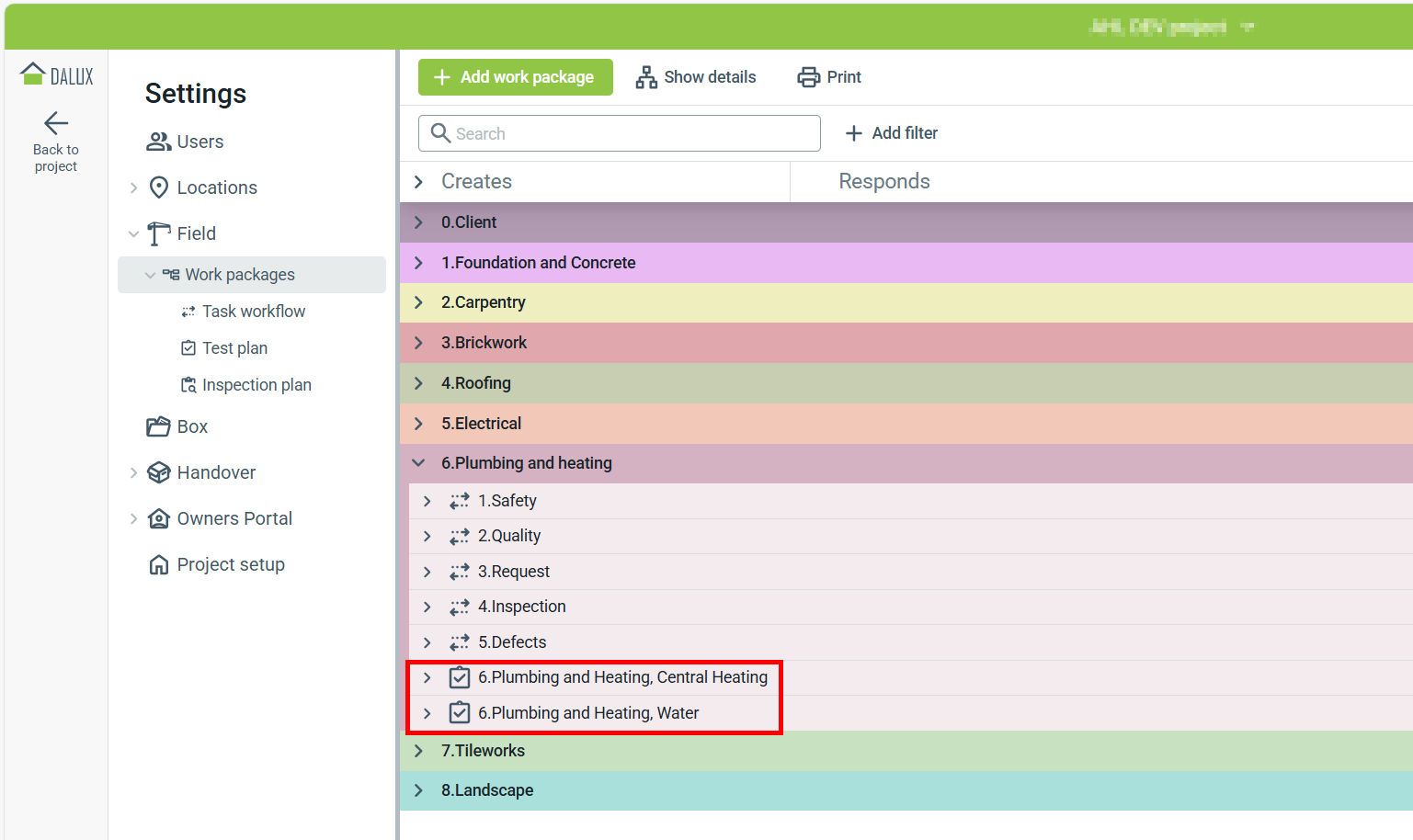
With the new release, test plans and inspection plans will no longer be added to existing task workflows. Instead, they will be placed in their own dedicated workflows, named after the corresponding plan.
As a result, the workflow column in the set up window will be removed:
Each individual test plan and inspection plan will have its own dedicated workflow within the work package shown with their respective icons (/
).
If multiple plans were added to a single workflow, each plan will now be added as a separate workflow.
New test and inspection plans are added to work packages by adding a new workflow:
It is still possible to see where the plan is attached under Settings, but you can no longer make changes from there.
Now, adding two test plans to the same work package creates two distinct workflows.
(Previously, you could only see multiple test plans linked to a workflow in the test plan settings.)
 User groups and access
After the release, the new workflows will incorporate the user groups from the original workflows, with some minor adjustments based on whether it is a test plan or an inspection plan.
Test plans
All user groups that were part of the original task workflow, which included the test plans, will now be assigned to the first role in the new workflow. This means they will still have the same permissions to view and create registrations on the test plan.
The workflow "3.Request" had a test plan attached. After the release, a new workflow will be created, and all users from the "3.Request" workflow will be assigned to the first role in the new test plan workflow:
Inspection plans
The new workflow for inspection plans will replicate the exact layout of the original workflow, including any task templates that were associated with inspection plans and added to the workflow.
Associated tasks will be removed from the Inspection plan card, as tasks can now be added directly to the workflow when the Inspection plan is added to a work package.
Any task added to the workflow will automatically behave like the previously used associated tasks:
Read more
If you want to learn more about the test plans and Inspection plans, these articles will be updated after the release to reflect the changes and new features.