Welcome to the Dalux release notes for version 2026.3.
This update will be rolled out between May 30th and June 13th, 2026, depending on your region.
You can find the key highlights, change log, and detailed release notes for Dalux 2026.3 right here.
If you want to be notified about upcoming Dalux releases, you can sign up to Get early notifications for Dalux software releases.
| Model validation in 2D split view and grouped by level | Rename uploaded files with required file naming templates | Move around in SiteWalk while comparing |
| Filter model validation results by building level and see your clashes in the split view. | Rename files during the upload process using file naming templates and project metadata. | Navigate around your SiteWalk reality capture while comparing side by side. |
To find the release notes you are looking for, open the drop-down menus and click on the links.
Field
- Move around in SiteWalk while comparing
- Zone column in SiteWalk list view
- Exported 360 images are hyperlinked on overview drawing
- Shared checklist values in list views
- Checklist filters in work packages
- See linked tasks to checklists in the list view
- Consistent meeting number items across follow up meetings
- Generate new QR code for public safety observations
- Print public safety observations
- Public safety observations notifications and daily summaries
- Updated Safety dashboard
- Improved print support for daily logs
- Colored groups in Quantities
- Increased export limit in Quantities
- Scheduled Owners Portal exports
- Access previous Owners Portal reports during export or after failed exports
Box
- Open Dalux Box tabs in separate windows
- Rename uploaded files with required file naming templates
- Warning if file names exists in different folders
- File tabs in comments and duplicate comments during creation
- Manual alignment of drawing in compare mode
- File flow PDF reports
- File flow dashboard
- Clearer file flow creation steps
- Dalux AI Assistant improvements
- Feature activation logged in activity log
Dalux Sync and Dalux desktop app
Deprecation notice
 Field
Field
Move around in SiteWalk while comparing
You can now navigate around your construction site while comparing SiteWalks from different dates or with your BIM model. This makes it easier to track progress and find the photo documentation you need.
You can also use the left and right arrow keys to move to the next or previous step in SiteWalks and the space bar to reset the zoom level.
Zone column in SiteWalk list view
Metadata for zones that a SiteWalk moves through has been added to the SiteWalks list view. This makes it easier to sort or filter SiteWalks by zone.
Exported 360 images are hyperlinked on overview drawing
When exporting 360 images, such as those from a SiteWalk, along with an overview drawing from Dalux, the image labels are now directly linked to their corresponding exported images. This makes it easy to open an image quickly from its specific location.
Shared checklist values in list views
We are introducing a new system to see checklist values used across multiple checklists. In the checklist settings, you can select up to 250 shared values for filtering in list views. You can select values from checklists, hold-point checklists, and from checklists added to test plans and inspection plans.
Checklist filters in work packages
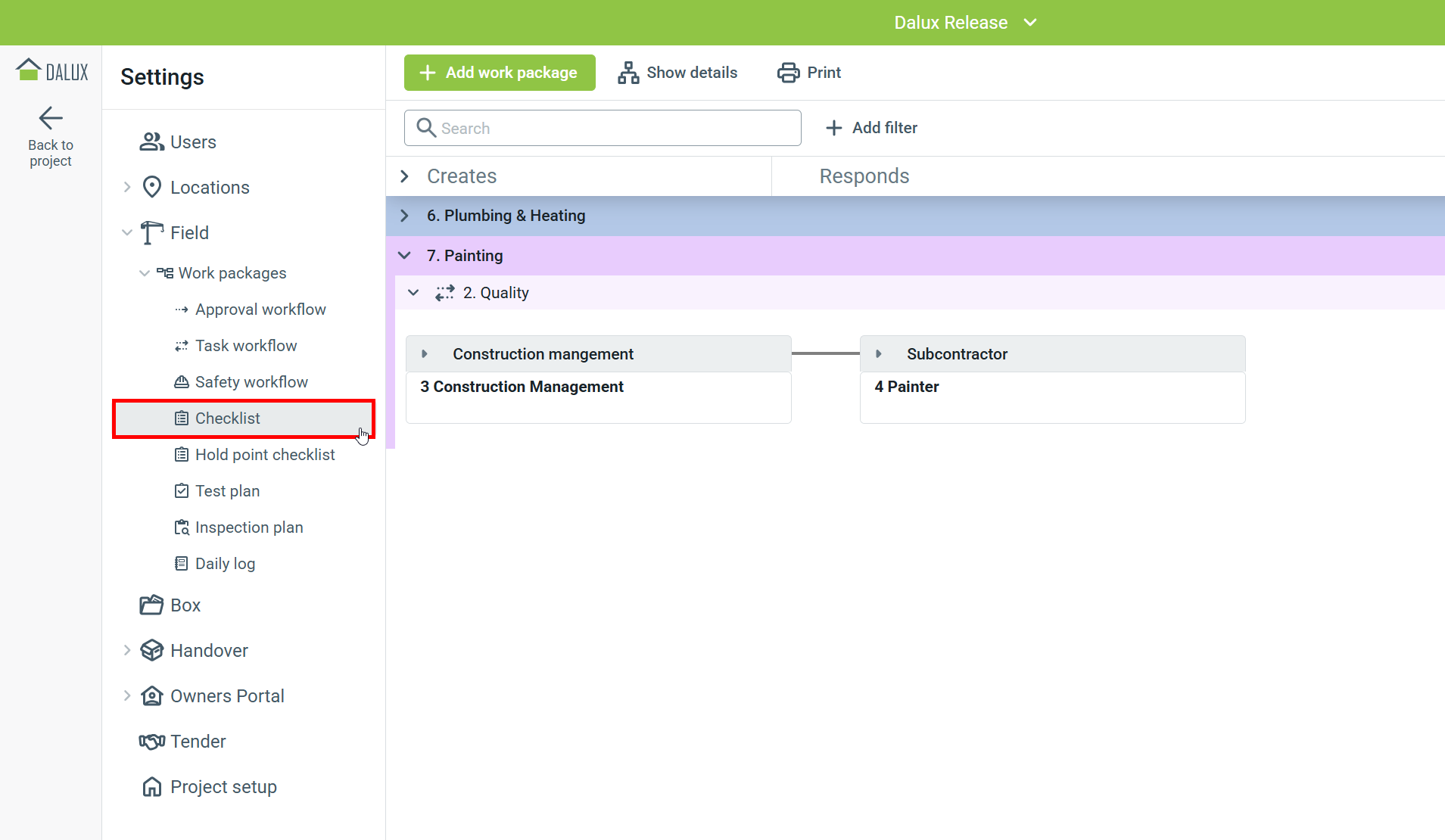
Checklists are now available as a predefined filter for work packages, making it easier to see which work packages and workflows include checklists.
When you expand a work package, all the workflows inside it will also expand, giving you a complete view of the work package content.
 See linked tasks to checklists in the list view
A new column has been added to the list view of checklists, allowing you to filter and sort by checklists with links to tasks. Field observers also have a separate column showing which task numbers have been added to the checklist.
Consistent meeting number items across follow up meetings
To keep meeting minutes consistent, the numbering of each meeting item will stay the same once the series has started. Meetings in a series will now follow the original template. For example, the numbering of a meeting item won’t change if it is moved up or down in the order.
Generate new QR code for public safety observations
You can now create a new QR code for public safety observations whenever necessary, such as if the current code is being misused. Generating a new QR code will disable the old one, meaning that only the new code can be used for public safety observations.
Print public safety observations
If you need to save or share print public safety obrsevations as PDF files, they can be print directly from the list view.
Public safety observations notifications and daily summaries
Public safety observations are now included in your daily summary email.
If you have task notifications enabled and are in the Safety manager user group, you will receive an additional email notification whenever new public safety observations are added.
Updated Safety dashboard
The Safety dashboard has been updated to better meet the needs of safety managers. These changes gives a full overview of safety on-site, including trends from the past month and previous safety inspections. Safety managers can now easily identify safety issues or observations requiring their attention.
Improved print support for daily logs
The daily log printing options have been updated to include landscape orientation and A3 format. If your daily logs contain many columns, printing in landscape will give you a better printed result. Additionally, tables that span multiple pages are now formatted better.
To make sure daily logs print correctly, you can add up to 15 data fields for each daily log type.
Colored groups in Quantities
When you group by a property in Quantities, the items in each group are now automatically color-coded. This makes it easy to differentiate between objects.
Increased export limit for quantities
The export limit has increased from 20,000 to 40,000, enabling you to export more quantity data from Dalux.
Scheduled Owners Portal exports
Users in the Field observer user group can now create scheduled exports directly from the Owners Portal filters. You can schedule the export weekly or monthly, choose the export day, and set start and end dates.
This automates and makes it easier to get data in and out of the Owners Portal, reducing the need for manual exports.
Access previous Owners Portal reports during export or after failed exports
You can now access previous Owner Portal exports, even if an export is currently in progress or has failed. A notification banner will let you know if you are viewing an older version of a report, so you do not accidentally export outdated versions.
 Box
Box
Open Dalux Box tabs in separate windows
Boost your productivity by undocking Dalux Box tabs and working across multiple monitors. You can now open Box tabs in a new window, allowing you to easily view multiple files at once. For example, you can have a specification on one screen and relevant drawings on another.
Rename uploaded files with required file naming templates
You can now rename files during the upload process. This is done by adding or updating the necessary metadata based on your project's required file-naming template. This means you do not have to rename files on your device before uploading them again.
For projects using file naming templates to keep metadata and versioning consistent, this helps make sure the naming standards of the project are followed, even if the person uploading the files is not familiar with the specific conventions.
Warning if file names exists in different folders
You will now see a warning when you upload a file with a name that already exists in another folder within your project. This helps you avoid accidentally uploading the same file to multiple folders.
The file path is displayed to allow you to double-check before committing to the upload.
File tabs in comments and duplicate comments during creation
We now support file tabs when viewing a comment on a drawing or document.
This allows you to duplicate a comment when adding a new one, or from the Actions menu when viewing a comment. This makes it quicker and easier to duplicate individual comments for issues across multiple drawings or documents.
Manual alignment of drawing in compare mode
While comparing you can now manually align drawings versions that may have become misaligned. This makes it easier to continue working in Dalux, even if the drawings have shifted.
The alignment of the drawing does not affect the drawing itself and will not be saved between comparisons.
File flow PDF reports
You can now print or export a PDF file flow report for approved or authorized files. The PDF report includes a thumbnail of the file, its version, the Box folder it is in, and its file flow history. You can see what or who triggered the flow and who completed each step, as well as when each step was completed.
You can print the file flow report from the list view or directly from the file.
File flow dashboard
We have added a file flow dashboard to the Box home tab. Project administrators and Project planning managers can find the file flow dashboard on the home screen of Dalux Box.
The dashboard provides a clear overview of the progress of file flows in your project and helps identify potential bottlenecks. The dashboard shows overdue and upcoming deadlines for file flows, as well as how these are distributed across user groups.
Clearer file flow creation steps
When setting up file flows, you will be asked to choose between manual and automatic distribution for the final approval or authorization step. A new toggle option during setup makes this choice clearer. If you select Manual, you will need to add a user group for the final review of the files.
Dalux AI Assistant improvements
The AI Assistant is now available in all Box Pro projects. We have improved its quality by adding more citations and references when you ask general questions such as "Summarize this document."
Feature activation logged in activity log
The activity log now includes records of when Box features are activated or deactivated, along with the name of the person who made the change.
 InfraField
Elevation marker shows on alignments in cross sections
When viewing a model cross sections along an alignment, we now also display a marker indicating the alignment's elevation. Making it clear at what elevation the alignment was designed in relation to the model.
New orthophoto comparison view
You can now compare orthophotos using a vertical slider that overlaps the images. This feature makes it easy to see the progress between orthophotos and allows you to adjust how much of each image is visible.
Adjust alignment offset and corridor width in profiles
In InfraField Quantities, you can now adjust the alignment offset and profile width to make minor corrections to the position of layers or to account for design changes. You can also set a specific distance for each side of the alignment.
Improved quality of DWG drawings on the map view
We have improved the way drawings appear in the map view of InfraField projects. DWG drawings are shown clearer and sharper at any zoom level.
|
Before |
After |
 Locations
Area measurement shown in point-to-point measurements
In our previous release, we introduced the ability to chain point-to-point measurements. We have further improved this feature so that, when you close the chained measurements into a shape, an area calculation is also shown.
Selected rooms in 2D highlighted
When you select a room in a drawing, it is now colored in to more clearly show the room shape.
 Design
Model validation in 2D split view and grouped by level
You can now group model validation results by building level.
This also allows you to view your model validation clashes in split view. You can start model validation directly from the split view, which automatically filters by your selected level of filter by level in 3D.
Clashes are displayed in both 3D and as an overlay on the 2D view, showing your clashes in more context.
Model validation templates have also been added to the company profile (see below).
Model validation history chart
A history chart has been added to the model validation. It shows new and total classes over time. The chart updates based on your selection in the matrix. The chart updates automatically every day.
Enhanced clash matrix accuracy by removing duplicate intersections
Model validation checks used to appear twice in the matrix when comparing two disciplines, because we checked both "A vs. B" and "B vs. A". The results are now combined so each discipline pair is shown only once. This applies to new checks or disciplines added to model validation. You can still set up checks for both pairings if needed.
Model compare in 2D
Comparison mode in Design has been improved, allowing you to view your 3D model comparison results directly on your 2D drawings. This makes it easier to identify exactly which elements have changed in a 2D view.
 Tender
Create folders and add files to tender folders automatically from Box
When you add files to the top level of a tender group from Box, you now have the option to:
- Create new folders in the tender that match the folders from Box
- Automatically add files to existing matching folders within the tender
You can still add files directly to individual folders if needed. This feature helps you create the same folder structure in both Box and Tender, making folder setup faster and ensuring files are organized consistently.
New Tender overview for tender organization
The Home menu for users in the tender organization has been updated to show an overview of all tenders across your groups. You can easily see which tenders are ongoing, ended, or in draft.
Add files from version sets to tenders
You can now add files to tender groups directly from version sets. This makes it easier and quicker to include the right files in your tenders. For example, you can use a version set that contains all the files ready for a specific tender.
Version sets are also shown in file list views in Tender, so you can see which files come from a specific version set.
Download your bid submission receipt
After submitting a bid for a tender, you can download a receipt directly from Dalux. This creates a PDF report including details such as the tender name, submission date, and who submitted the bid and when. It also includes each tender requirement and the corresponding answer.
Recent files in the Home tab
Bidders can now view recently added tender files right from their home screen. The newest files appear at the top, allowing bidders to quickly see any additions made since their last visit.
 Handover
Dedicated review manager role added to Handover
Projects using Dalux Handover now include the Handover review manager user group. This group will be automatically added to the review manager step in Handover workflows. Handover review managers can view all assets and documents, access tasks, lock assets, and create tasks on assets.
Analytics dashboard simplification
We simplified the asset status charts on the Handover Analytics Dashboard and added a tooltip that explains how assets are grouped by status. These changes make the initial overview clearer and easier to understand.
 Company profile
Model validation templates added to company profile
You can now import model validation templates from projects into the company profile. You can activate these templates for your project standards and select a template to use for new projects. This makes it easier to maintain consistent model validation matrices across projects and saves time when setting up project disciplines.
Status setup added to the company profile
To help ensure consistent status codes across multiple projects, the status setup has been added to project standards in the company profile. If you also use file areas in your project standards, you can set up specific status codes for each activated file area.
Daily log added to company profile
You can now activate daily logs in your project standards and add daily log types to your Field library in the company profile. This helps keep daily log types consistent across your projects for better data tracking and makes setting up individual projects faster. Daily log types can be imported from projects to the company profile.
See all projects in the same coordinates on the map view
You can now see the full list of projects with the same coordinates on the map view if there are multiple projects.
 Dalux Sync and Dalux desktop app
Dalux Sync 4.5 released
Dalux Sync 4.5 is now available for download.
This update adds version sets and custom metadata file validation to Dalux Sync. It also improves the application's stability with enhanced error handling and user feedback.
Performance enhancements to BIM Viewer on desktop
The performance of the Dalux BIM Viewer in the desktop app has been improved, making it even faster, especially when working with very large BIM models. We recommend using the Dalux desktop app when working with large BIM models.
You can learn more about downloading the latest version of the desktop app here: Downloading the Dalux desktop app
Deprecation notice
Limiting number of linked tasks
In our next release (2026.5, expected in August 2026) (2026.4, expected end of June 2026), we will be setting a limit of 40 tasks that can be linked to a single task. This change will only be applied to new projects.